You're running Playwright in headed mode. Real browser, real mouse movements, random delays between actions, custom user agent string. You've done everything absolutely right. The site still blocks you.
I've been there. I spent weeks adding stealth plugins, injecting scripts to override navigator.webdriver, randomizing viewport sizes — the whole circus. Some of it helped. Most of it didn't. Then a colleague at work mentioned Patchright, and I felt completely stupid for not finding it sooner.
Here's the thing: the problem was never the code I wrote. The problem was Playwright itself.
Playwright Was Never Meant to Hide
Playwright is a testing tool. Microsoft built it to automate browsers for testing — not to sneak past bot detection and scrape DataDome. Why would they? If you're testing your own app, you want the browser to know it's automated.
So Playwright doesn't even try to be invisible. And that's fine — until you need to automate against a site that aggressively doesn't want to be automated.
I learned this the hard way. I was building production scraping pipelines at work, running Playwright in headed mode with random delays, human-like typing, the works. Sites with basic protection let me through. But anything running Cloudflare or DataDome? Blocked instantly. Every single time.
The most frustrating part was that I couldn't see what was wrong. The browser looked normal. The behavior looked human. But something underneath the hood was giving me away.
What's Actually Leaking
Once I finally started digging, I found that Playwright leaks in ways you physically can't fix from the outside:
The big one is how Playwright talks to the browser. It calls Runtime.enable on the Chrome DevTools Protocol to execute JavaScript. Detection scripts can easily check whether Runtime.enable has been called — and if it has, you're flagged. There's no magical Playwright config option to turn this off. It's baked into exactly how the tool works.
Then there's the obvious stuff. Playwright launches Chromium with flags like --enable-automation which literally hardcodes navigator.webdriver to true. Every detection script checks this first. You can try to override it with JavaScript injection, but sophisticated detectors just check if it was overridden after the fact — they know that trick.
And the subtle stuff. Playwright disables popup blocking, disables extensions, disables component updates, disables default apps. Each one alone isn't an immediate red flag. But stack them all together and the browser's fingerprint looks absolutely nothing like a real user's browser. It's like showing up to a party in a disguise but wearing a literal name tag that says "I'm in disguise."
I tried fixing each leak individually — custom scripts, launch args overrides, extension injection. You can patch some of them, but you can't patch Runtime.enable from the outside. That one requires fundamentally changing Playwright's source code.
Which is exactly what Patchright does.
So What is Patchright
Patchright is a fork of Playwright that fixes the detection leaks directly at the source code level. Not a plugin you add on top. Not a stealth script you inject at launch. The actual, literal Playwright codebase, patched.
The biggest change: instead of calling Runtime.enable (which is highly detectable), Patchright executes JavaScript through isolated ExecutionContexts. You get the exact same result for your code — page.evaluate(), locators, everything works identically. But the detection signal is entirely gone.
It also cleans up all the command flag problems — it actively removes the automation flags, adds --disable-blink-features=AutomationControlled, and re-enables extensions and default apps so the browser actually looks like a normal Chrome installation.
The trade-off? You lose console.log in the browser context because Patchright purposely disables the Console API (another detection vector). Honestly, I don't miss it. I use Node.js logging for debugging, not the browser console. And if I really need browser-side debugging, I just switch back to vanilla Playwright for that single session.
The result is that Patchright in headed mode passes every major detection system I've thrown at it — Cloudflare, DataDome, Kasada, Akamai, Fingerprint.com. I've literally been running it in production for months.
Installation
Two commands:
npm install patchright
npx patchright install chromium
It sits directly alongside Playwright — you don't uninstall or replace anything. Both can happily coexist in the same project.
One thing: Chromium only. Patchright doesn't patch Firefox or WebKit. For scraping, this is perfectly fine — Chromium is what you want anyway.
The Code Change
Here's the part that made me feel stupid for not switching sooner.
Vanilla Playwright:
import { chromium } from 'playwright';
Patchright:
import { chromium } from 'patchright';
That's it. That's the entire migration. One single import. The exact same API, same methods, same page.goto(), same page.click(), same page.evaluate(). Your existing Playwright code works identically with Patchright just by changing a single word.
I migrated a 2,000-line production scraping codebase to Patchright in about 5 minutes. Most of that was just doing a global find-and-replace.
Seeing the Difference
Run both against Pixelscan — a public page that checks every single automation signal it can find.
Vanilla Playwright:
import { chromium } from 'playwright';

async function main() {
  const browser = await chromium.launch({ headless: false });
  const page = await browser.newPage();
  await page.goto('https://pixelscan.net/');
  await page.waitForTimeout(5000);
  await page.screenshot({ path: 'playwright-pixelscan.png', fullPage: true });
  await browser.close();
}

main();
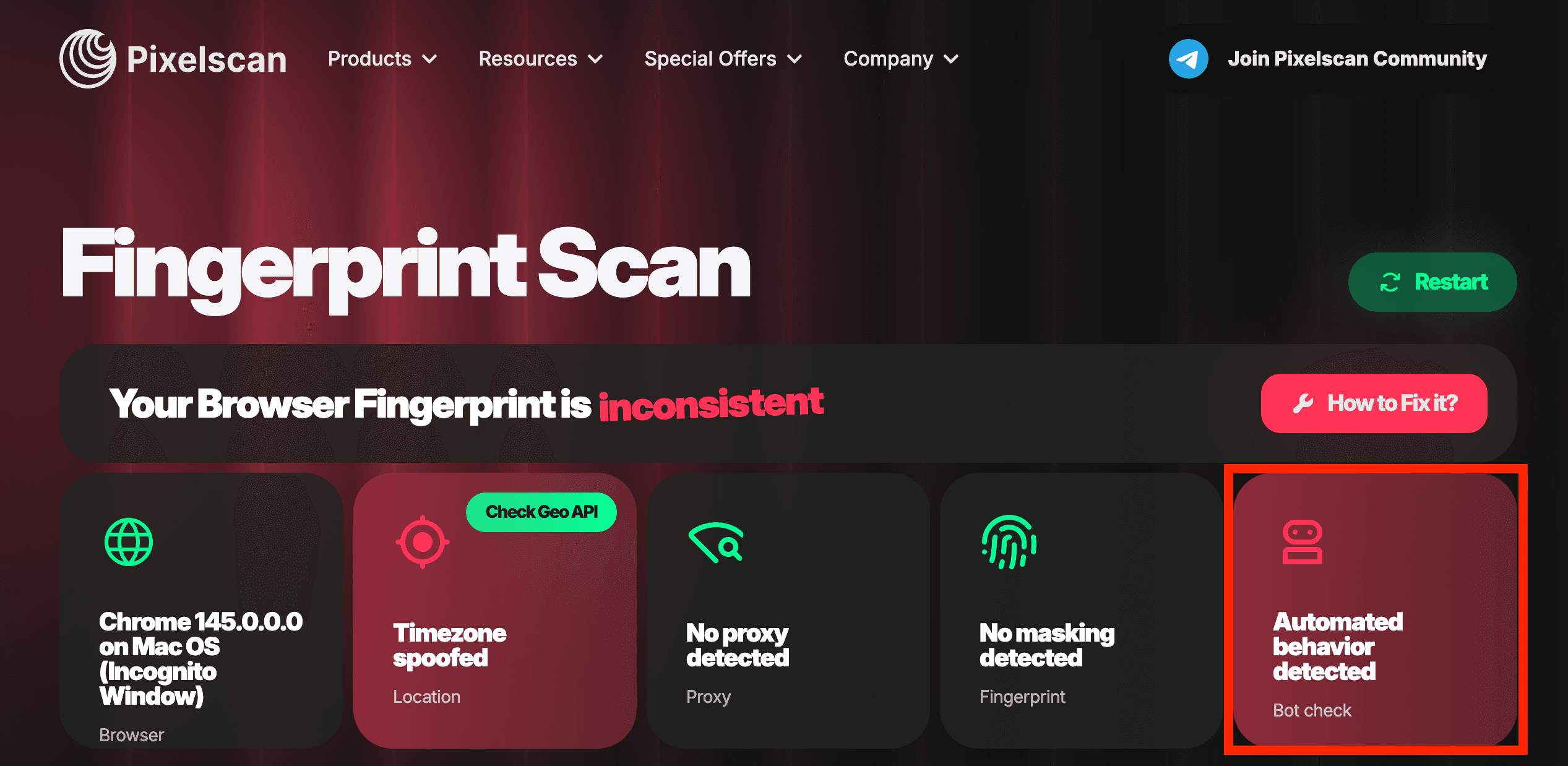
Result: Red flags everywhere. navigator.webdriver detected, WebDriver present, automation signals actively lit up.
Patchright:
import { chromium } from 'patchright';

async function main() {
  const browser = await chromium.launch({ headless: false });
  const page = await browser.newPage();
  await page.goto('https://pixelscan.net/');
  await page.waitForTimeout(5000);
  await page.screenshot({ path: 'patchright-pixelscan.png', fullPage: true });
  await browser.close();
}

main();
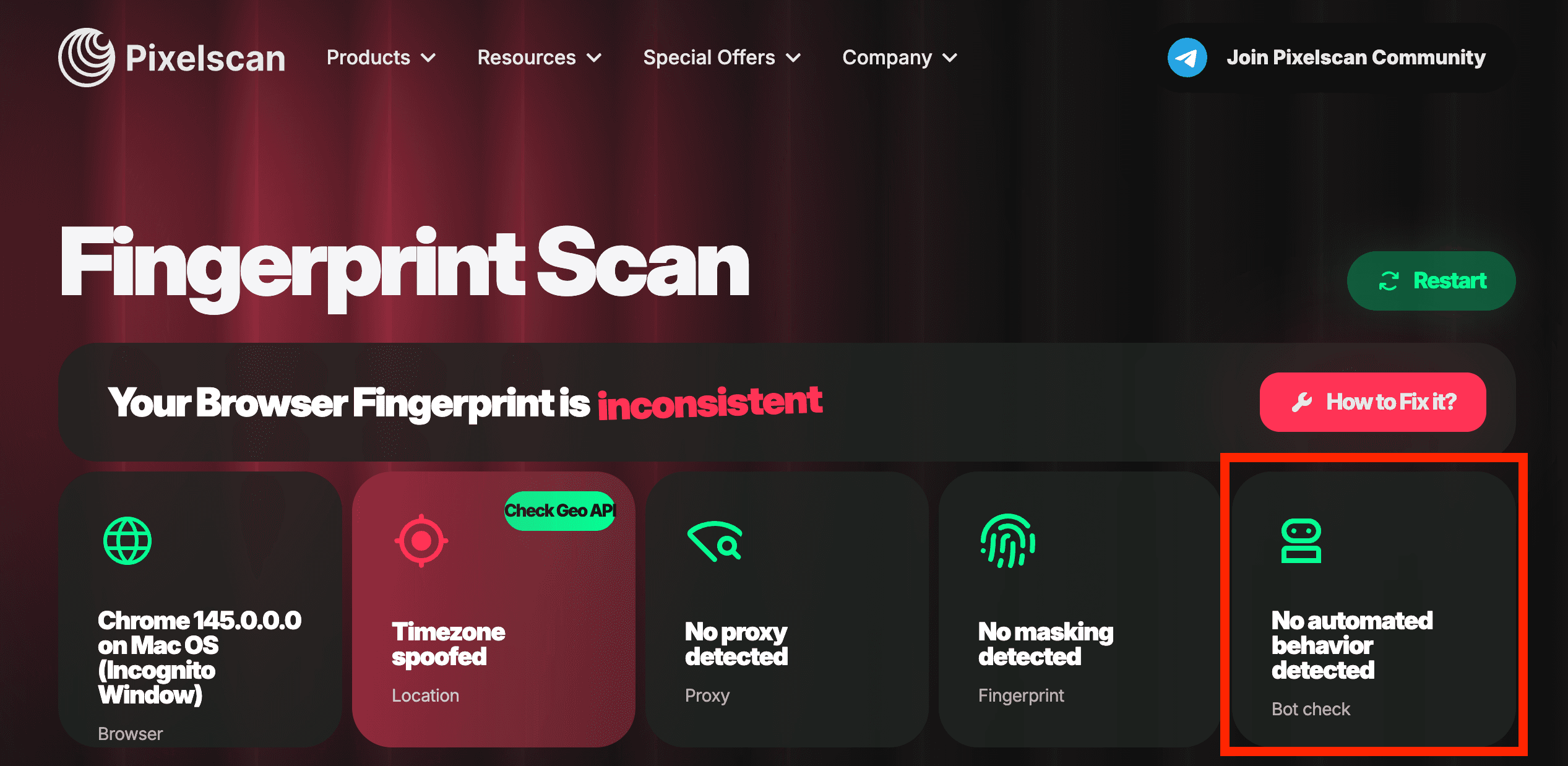
Result: All green. The exact same code. One import change.
Vanilla Playwright on Pixelscan:
Patchright on Pixelscan:
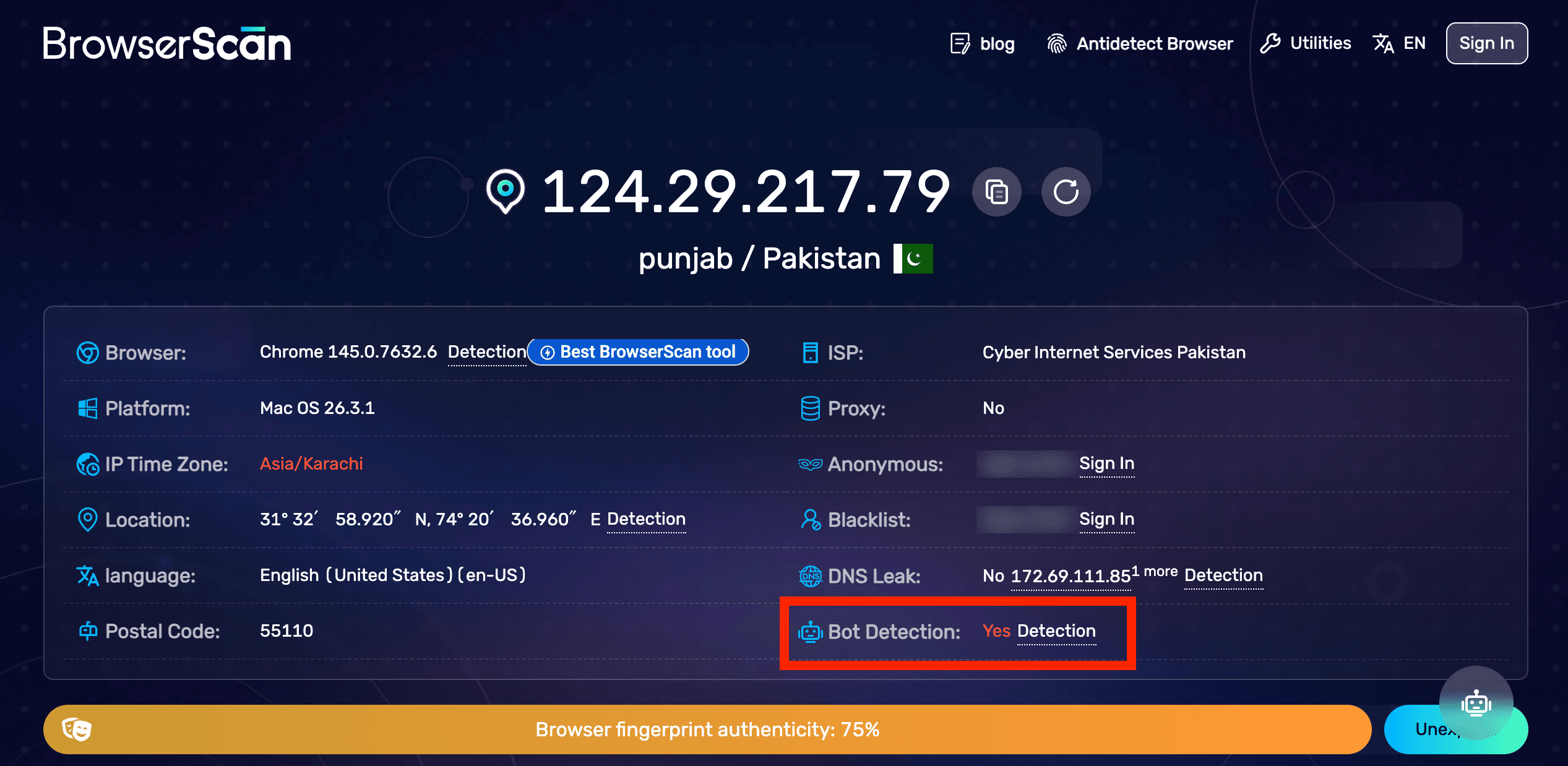
Playwright on BrowserScan:
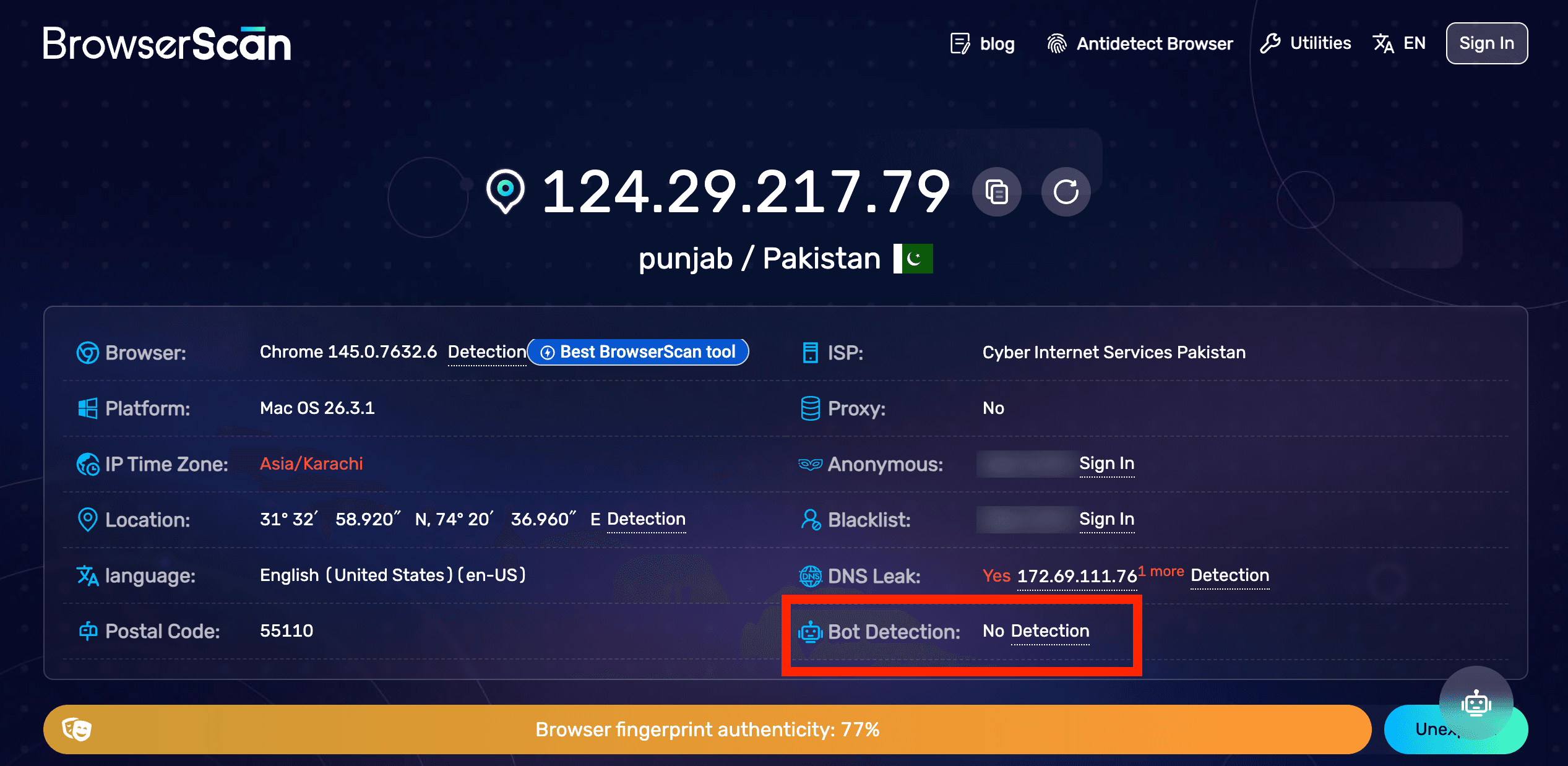
Patchright on BrowserScan:
When to Use Which
Don't overthink this. The rule is extremely simple:
Use Playwright when you're testing your own app, scraping smaller sites that don't have aggressive bot detection, or running tests in CI. It's the better-supported tool with a bigger ecosystem. Always use it by default.
Use Patchright when you're hitting bot detection you physically can't get past. Cloudflare challenges, DataDome blocks, CAPTCHAs appearing organically out of nowhere. Switch the import and see if the problem entirely disappears. Most of the time, it will.
Don't use Patchright for absolutely everything just because you can. It's a fork — it lags slightly behind official Playwright releases, it has a few edge-case bugs that vanilla Playwright doesn't, and you explicitly lose browser console access. Use the right tool for the job.
Patchright isn't the only stealth-patched fork anymore, either. rebrowser-patches takes a similar CDP-minimal approach (skipping Runtime.enable via Page.createIsolatedWorld), and Camoufox does the same job on Firefox instead of Chromium if you need a non-Chromium engine. There's also invisible_playwright, a newer entrant with its own published comparison against rebrowser-patches for anyone weighing the tradeoffs directly rather than taking either project's word for it. Worth comparing if Patchright alone doesn't get you past a particular target — but Patchright remains the most widely used option and the one with the most active community around it, and remained actively maintained with real releases as recently as August 2026, which matters for a stealth tool specifically since detection techniques evolve and an abandoned fork stops being undetectable the moment sites catch up to whatever it was patching.
One more genuinely useful detail worth knowing if you're going deeper than the basic import swap: Patchright exposes an isolated_context option (on by default) that lets you explicitly control whether your page.evaluate() calls run in the page's main JavaScript context or a fully isolated one. The isolated default is what makes the stealth work — it's the same mechanism keeping Runtime.enable out of the picture — but there are legitimate cases (needing to read or modify a global variable the page itself defined, for instance) where you need main-context access despite the detection tradeoff, and knowing the flag exists means you don't have to choose between "fully stealthy" and "can't do this one specific thing" as an all-or-nothing decision.
What I Pair It With
Patchright perfectly handles the browser fingerprint, but that's only half the battle. In production, I also heavily use:
- Rotating residential proxies — Your browser fingerprint might look remarkably human, but if 500 requests come from the same exact datacenter IP, you're done. Rotate per session.
- Random delays — Not
waitForTimeout(1000)on every action. Actual, organic randomness. I useMath.random() * 2000 + 500so each wait is uniquely different. - Fresh contexts — Launch a new browser context per session. Don't carry cookies or state between different scraping accounts.
- Headed mode — Always. Even with Patchright, headed vs headless makes a highly detectable difference. In CI, use
xvfb-runto run headed without needing a physical display.
Patchright solves the absolute hardest part — the undetectable leaks you can't fix from the outside. The rest is just common sense web scraping.
Getting Started
npm install patchrightnpx patchright install chromium- Change your imports from
'playwright'to'patchright' - Run in headed mode
- Stop getting blocked
If you're new to Playwright entirely, definitely start with the Playwright tutorial on this site — learn the API extremely well first, then come back here when you actually need stealth.